Logo

Table of Contents

  • About
  • Introduction
  • License
  • First Time Users
  • Getting Started
  • Security Onion Console (SOC)
  • Security Onion Desktop
  • Network Visibility
    • AF-PACKET
    • BPF
    • Stenographer
    • Suricata
    • Zeek
    • Strelka
    • Intrusion Detection Honeypot
  • Additional Network Visibility
  • Host Visibility
  • Third Party Integrations
  • Rules
  • Logs
  • Updating
  • Accounts
  • Services
  • Customizing for Your Environment
  • Tricks and Tips
  • Utilities
  • Help
  • Security Onion Pro
  • Security
  • Telemetry
  • Release Notes
  • Appendix
  • Cheat Sheet
Security Onion Documentation
  • Network Visibility
  • View page source

Network Visibility

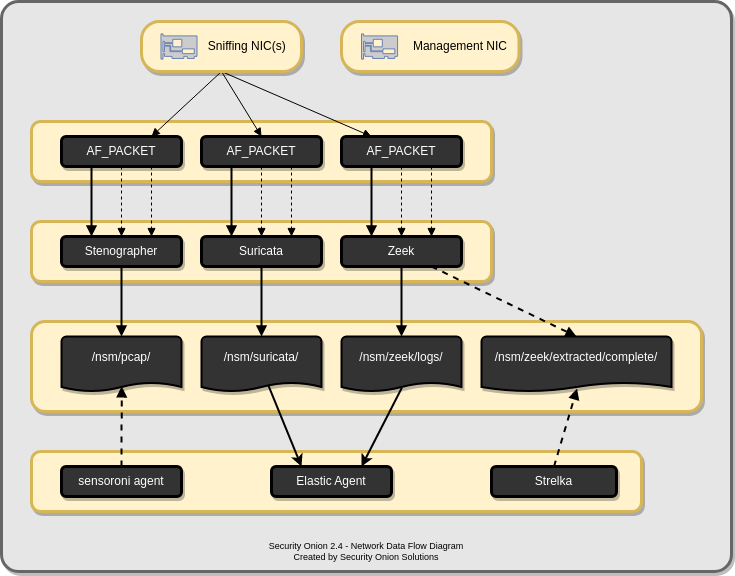
When you log into Security Onion Console (SOC), you may see alerts from Suricata or Intrusion Detection Honeypot, protocol metadata logs from Zeek or Suricata, file analysis logs from Strelka, or full packet capture from Stenographer or Suricata. How is that data generated and stored? This section covers the various processes that Security Onion uses to analyze and log network traffic.
_images/sniffing.png
  • AF-PACKET
    • VLAN tags
    • More Information
  • BPF
    • Configuration
    • More Information
  • Stenographer
    • Output
    • Analysis
    • Command Line
    • Configuration
    • Disk Free Percentage
    • Maximum Files
    • Diagnostic Logging
    • Disabling
    • VLAN Tags
    • More Information
  • Suricata
    • Community ID
    • VLAN Tags
    • Configuration
    • HOME_NET
    • EXTERNAL_NET
    • Stats
    • Performance
    • Metadata
    • File Extraction
    • PCAP
    • Diagnostic Logging
    • Testing
    • Troubleshooting Alerts
    • Testing Rules
    • Variables
    • Disabling
    • More Information
  • Zeek
    • Community ID
    • Packet Loss and Capture Loss
    • Configuration
    • HOME_NET
    • Performance
    • Disabling
    • Syslog
    • Logs
    • File Extraction
    • VLAN Tags
    • Intel
    • Diagnostic Logging
    • More Information
  • Strelka
    • Alerts
    • Logs
    • Configuration
    • Diagnostic Logging
    • More Information
  • Intrusion Detection Honeypot
    • Installation
    • Configuration
    • Technical Background
    • Services Configuration
    • sshd
    • Custom Configuration
    • Custom Configuration Example
    • Activating Additional Network Interfaces
Previous Next

© Copyright 2026.

Built with Sphinx using a theme provided by Read the Docs.